Author: MacAdmin

  • Spotify on a BMW

    A while ago I spent quite a while working out why Spotify was unreliable on my late 2019 M2C. It just wouldn’t always show up. You could still listen to music from it you just couldn’t control it from iDrive. Infuriating. Anyway, I eventually got it reliable. Then what happens…Spotify issue an update which means it doesn’t work AT ALL. I won’t get into how crap the integration is with Android devices (I’ve started using an old iPhone for CarPlay), but fortunately there is a way to resolve the issue. 

    So, what issue am I talking about? Two issues, namely:

    • Spotify showing up on iDrive is unreliable. It works sometimes.
    • Spotify then stops working AT ALL, ever.

    There’s two different fixes here, but you need to apply the below fix before doing what I suggest in my video. The video is down below. These changes have made it so that Spotify connects 9 times out of 10, which is way better than 0 out of 10. The trick here is that later versions of the Spotify app simply remove this capability, so you have to downgrade to a previous version, and you have to turn off Auto-updates in the Google Play store. Just to be clear, I’m not that familiar with Android – I struggle to get that interested in mobiles, they seem to have stagnated and they all seem to do the same thing – if somebody knows a way of being able to leave on auto-updates while not updating a specific app, I’m all ears.

    So, what do you do. You do this:

    Uninstall Spotify from your phone. Yes, you’ll need to re-download all your music again.

    Make sure you have the BMW Connect App installed.

    Turn off auto-updates in the Google Play Store.

    Now, go grab a previous version of the Spotify app from here: 

    https://spotify.en.uptodown.com/android/versions

    I’ve been using version 8.5.66.1002. Copy this to your phone and install that (this is known as side-loading, see here for some guidance).

    You can now start Spotify & the connected app and hopefully your Spotify should be more reliable…and actually connect. Downside is now and again you have to go in to the Google Play store and update your apps…..but not Spotify.

    Very irritating. Anyway, the original video is below.

  • Prerequisite installation failed: RewriteModule

    Well – it’s been a while hasn’t it? I don’t really blog much any more. Or rather I seem to have switched to YouTube. Anyway, I’ve been recently configuring some Skype for Business Server 2015 units running on Windows Server 2016, and during the ‘Setup Skype for Business Server Components’ part it keeps failing with a ‘Prerequisite installation failed: RewriteModule’.

    It’s fair to say it was getting a bit irritating. Anyway, after a fair bit of digging it seems to be the value of this key:

    HKEY_LocalMachine\SOFTWARE\Microsoft\InetStp\MajorVersion

    Any number above 7 and it seems to kill the installation. The pragmatic solution? Set it to 7 – do the installation – and then set it back to what it was. In my case it was 10(Hex).

    Hope that helps somebody out there!

  • Delete the Lync or Skype for Business Address Books

    There’s a lot been written about the Lync or Skype for Business Address Books over the years, so I’ll not go into that whole thing here. What I do get asked about though is clearing down address books on a client and downloading a clean copy. How can we do that automatically?

    Well, firstly, you need to be aware of how those address books get downloaded. Have a read of this article here, it explains the background.

    Downloading the Address Book in Lync 2013

    While the above is for Lync 2013, the process is much the same for Skype for Business 2015.

    Deleting the local copies of the address books involves deleting GalContacts.db and GalContacts.db.idx from the user’s SIP profile directory. For Skype for Business 2015, this is in this location:

    C:\Users\username\AppData\Local\Microsoft\Office\15.0\Lync\sip_sipaddress

    As we know that, it’s pretty easy to automate.

    I’ve written a script that will do this for you. You can download that script here.

    AutoDelAddressBook.rar

    The script also creates a log file of the work that it carries out. The below is an example output from the script:

    ==========================================================================================

    17-Nov-15:2:18:58 PM: Delete GalContacts Script.

    17-Nov-15:2:18:58 PM: Running on workstation: BERKPC

    17-Nov-15:2:18:58 PM: User: *****

    ==========================================================================================

    17-Nov-15:2:18:58 PM: Path root: C:\Users\*****\AppData\Local\Microsoft\Office\15.0\Lync\

    17-Nov-15:2:18:58 PM: Temp Path: C:\Users\*****\AppData\Local\Temp

    ==========================================================================================

    17-Nov-15:2:18:58 PM: Checking to see if TEMP file exists….

    17-Nov-15:2:18:58 PM: Temp file does not exist.

    17-Nov-15:2:18:58 PM: Getting directory of all SIP users…

    17-Nov-15:2:18:58 PM: Command for directory: CMD.exe /c DIR C:\Users\*****\AppData\Local\Microsoft\Office\15.0\Lync\sip_* /b >C:\Users\*****\AppData\Local\Temp\GalContactsDel.TMP

    17-Nov-15:2:18:58 PM: Running command….

    17-Nov-15:2:18:58 PM: Checking to see if TEMP file exists….

    17-Nov-15:2:18:58 PM: Temp file found, directory completed.

    ==========================================================================================

    17-Nov-15:2:18:58 PM: Opening temp file, scanning for GalContacts file in each specified SIP directory…

    17-Nov-15:2:18:58 PM: Working on: sip_***@*****.**.**

    17-Nov-15:2:18:58 PM: Full Path: C:\Users\*****\AppData\Local\Microsoft\Office\15.0\Lync\sip_***@*****.**.**

    17-Nov-15:2:18:58 PM: Could not find GalContacts.db in directory.

    17-Nov-15:2:18:58 PM: Could not find GalContacts.db.idx in directory.

    17-Nov-15:2:18:58 PM: Working on: sip_****@***.***

    17-Nov-15:2:18:58 PM: Full Path: C:\Users\*****\AppData\Local\Microsoft\Office\15.0\Lync\sip_****@***.***

    17-Nov-15:2:18:58 PM: Could not find GalContacts.db in directory.

    17-Nov-15:2:18:58 PM: Could not find GalContacts.db.idx in directory.

    17-Nov-15:2:18:58 PM: Working on: sip_****.********@***.***

    17-Nov-15:2:18:58 PM: Full Path: C:\Users\*****\AppData\Local\Microsoft\Office\15.0\Lync\sip_****.********@***.***

    17-Nov-15:2:18:58 PM: Could not find GalContacts.db in directory.

    17-Nov-15:2:18:58 PM: Could not find GalContacts.db.idx in directory.

    ==========================================================================================

    17-Nov-15:2:18:58 PM: Completed.

    17-Nov-15:2:18:58 PM: Deleting temp file….

    17-Nov-15:2:18:58 PM: Number of profiles scanned: 3

    17-Nov-15:2:18:58 PM: Number of GalContacts.db deleted:0

    17-Nov-15:2:18:58 PM: Number of GalContacts.db.idx deleted:0

    ==========================================================================================

    What the script does is searches a user’s home directory for all of the SIP identities, and then in those identities removes those GalContact files. The script tells you which profiles were scanned, and how many removed.

    So, to use the script, the first thing you need to do is set up a shared directory for all of the log files. In my script currently, the logging directory is set to “\\BerkPC\Logging”. You will need to edit line 16 to reflect the correct path for your logs.

    ‘===========

    ‘Set the LOGPATH Variable to the directory that you want to house the logging output files.

    ‘Note do NOT include a trailing \

    ‘I.e. \\unc\logs is OK \\unc\logs\ is NOT ok

    ‘===========

    LogPath=”\\BerkPC\Logging”

    Once it’s set, you can fire the script at as many machines as you want – there’s various ways of doing that, group policy objects for example. Remember that it needs to be executed under a user context not the machine one, as it’s the user profiles we’re interested in.

  • Enabling Administrator users for Lync

    More of a place-holder this one, as I get asked about it a lot. When enabling a user for Lync you get a message like this:

    Insufficient access rights to perform the operation.

    The reason for this can be seen by referring to this article here:

    Lync Server Control Panel returns that error “Insufficient access rights to perform the operation” when attempting a move user or enable user command

    It’s simple to work around – use the Lync Management Console (PowerShell) to enable or move the user, job done.

  • Parallels Desktop 10.0

    Doesn’t seem that long ago that Parallels Desktop 9.0 was out – nor VMWare Fusion 6 – does it? My guess is there’s VMWare Fusion 7.0 just around the corner…

    Anyway, I wasn’t massively convinced by the upgrade to Parallels Desktop 9.0 – it didn’t readily offer me that much over the previous edition? Seemed upgrade money for no real benefit. Also, I ran into quite a few issues after the upgrade to 9, including:

    Issues with iSight Camera and Parallels Desktop 9.0
    Pauses & USB Connections/Disconnections

    …which to be fair were fixed in updates after a couple of months.

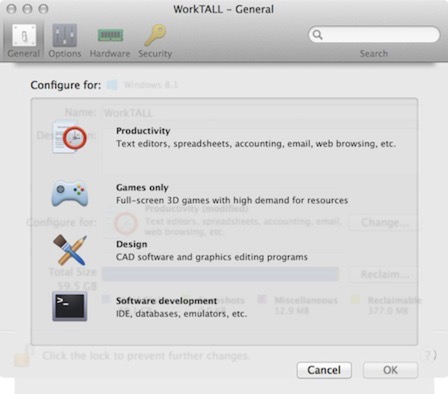
    So what about 10.0 then? Is it worth the money? Well, very early to say but initial suggestions tell me it very much is – but not necessarily for new functions and features as such, more for two key impacts of the upgrade, namely:

    Memory Footprint. This seems far improved in 10 – the same virtual machine on my late 2013 MBP Retina shows some 60% (!) less memory consumption after boot (which in my setup starts Outlook, Lync and a few other things). To be fair to Parallels, they state about a 10% saving – but on my work machines it was far larger.

    Battery Life Impact. This version seems to have a far less demanding load when running on battery.

    Just the above two key affects are a driver for me to upgrade – probably with the battery life one more so. I tend to avoid using virtualisation when on the move due to this impact, but the loading now seems more than reasonable, adding more functionality when mobile.

    Parallels also state that this version is compatible with OSX 10.10 Yosemite – to be fair, I’d not really ran into any issues using Parallels 9 on Yosemite either, but hey, who knows.

    Performance also seems to have taken a bit of a boost – and a real, noticeable one too. I wasn’t convinced with the claims of increases in performance with 8-9, however 9 to 10 really does seem to make a difference. Certainly in Office applications anyway – I’ve not noted any real performance increases with startup/shutdown or snapshot operations, but these were all very fast anyway. They state that there’s a 50% performance improvement….But who knows how valid that is – but I would agree it is faster.

    The Windows 7 look is still there, and it still uses Stardock.

    Some of the new features seem a little gimmicky – like the optimisation for example. All it seems to do is adjust the number of processor cores and RAM allocated to a machine? Not sure if there’s other optimisations in there, but I couldn’t really see it doing much more.

    10.10OSX_dump 2014-08-20 at 12.14.28
    10.10OSX_dump 2014-08-20 at 12.15.02

    There are some other neat touches to – for example running Outlook in a VM now shows on the Dock and indicates the number of unread messages in your selected mailbox, much like you would see in Apple Mail or in AirMail.

    Control Centre seems to have been tidied up too – everyone in one place, a little neater.

    One thing I do quite like is that all of a sudden coherence seems more usable – it’s smoother, and it’s less obvious you’re virtualising something. I don’t often use coherence, but I may do now.

    Anyways, early days – will report back after some more reasonable usage. Video below shows a run through on my late 2011 17” Macbook Pro.

  • Clearing the DNS Cache in MacOS/OSX

    A friend of mine was having some issues clearing the DNS Cache on his OSX 10.9 Mavericks machine – the well known way of doing it in terminal:

    sudo dscacheutil -flushcache

    …it doesn’t work though in Mavericks….and it doesn’t tell you either:

    ClearCache

    I could feel his pain…Anyway, the method of clearing the DNS Cache changed with 10.7 OSX Lion. To do it with Lion, Mountain Lion or Mavericks you need to use the following command:

    sudo killall -HUP mDNSResponder

    Cunning hey? Also, if you do the right thing and have your normal day to day account without Administrative rights, you may be interested in this article:

    Running Terminal as a Different User

    If you’re particularly lazy…there’s an app for this.

    EDIT: Apple Support document: OS X: How to reset the DNS cache

  • Convergence/Divergence

    While I’m predominantly a techy, I do get very actively involved in our sales cycles for products and services around the Unified Communications solutions. Exposure to this sales cycle has led me to question the whole convergence story – or rather where we are on that story.

    Convergence was/is a big thing – sticking to UC/telephony the move from TDM to VoIP was a significant one, and offered many benefits to companies from leveraging existing investment in infrastructure to providing better and more usable services for users.

    For a while pretty much every tender that passed through my area was UC focussed – companies just weren’t looking to replace a phone on a desk with another phone on a desk. They wanted something functionally stronger, and able to offer more flexibility in usage topologies to the service consumers.

    This took the shape of telephony (of course), voice conferencing, integration to Email platforms, Instant Messaging/Presence, web conferencing etc. All the stacks that we’re all (in UC anyway) fairly conversed with.

    What’s becoming apparent (or maybe I’ve only just really thought about it) is that there are distinct sets of companies out there that don’t want UC. What they want is telephony – and they see VoIP as a way of getting that cheap telephony. They’re not readily interested in all the feature rich capabilities delivered by UC&C. They want phones on desk, for their users…and they want them cheaper. They often (appear) to view telephony and VoIP as cost expenditures to be eroded, rather than as an investment platform to drive productivity.

    So is UC & telephony diverging again? Did it ever truly converge in the first place? It’s an interesting concept – and one that matches some vendors more than others. Take Cisco for example. While I don’t have the figures to hand (I’m sure I could Google it) they state that they have more than 100K+ collaboration customers world-wide, and that 95% of Fortune 500 using Cisco UC. That all may well be true, however some 75-80% of that is dial-tone…and dial-tone isn’t UC is it?

    I’m not particularly picking on Cisco here; it’s just the main competitor to Microsoft that came to mind.

    This divergence or selection of telephony or a UC platform is a challenging space for Microsoft to compete in. For a pure telephone-on-a-desk topology that doesn’t want or need the higher functionality offered by the Lync platform then pricing becomes an issue – vendors such as Mitel, Avaya & Cisco have the opportunity to deliver a more competitive offering.

    Of course trying to ‘step up’ a VoIP Telephony platform to UC is where things start to become harder, and it certainly affects that competitive offering. More product and licensing is needed, often with associated infrastructure.

    I suspect 2014/15 will see some significant change the UC/Telephony arenas – Microsoft is gaining ground on the traditional vendors, and Microsoft’s competitors are also upping their game. Of course competition is good – it drives innovation doesn’t it? I suspect we’ll also see changes in the cloud delivery (I got so far without saying cloud…go me). In my experience our clients seem happier to consider cloud when contemplating functionally rich UC (or Contact Centre) type services, but less so for pure VoIP telephony.

    I can envisage that pattern starting to change – VoIP as a service is quite a compelling one in its own right if its delivered, priced and modelled correctly, and the service users are fully aware of the capabilities of the platform.

    Whatever happens, UC & VoIP is a fascinating area of the technology market to work in. It changes quickly, and offers a lot of innovative products and services in its overall stack. I like that, it keeps things fresh & new.